The credit union recently integrated its credit card servicing platform into its online banking system. This was done to improve our fraud mitigation efforts to keep your accounts safe from the growing threat of fraud. It also offers the convenience of being able to manage your credit card account along with your other credit union accounts directly from online banking without having to sign in to a separate system.
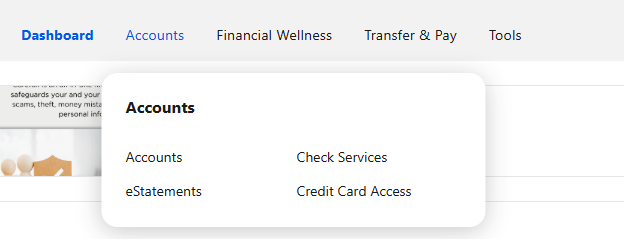
On January 15, the direct access credit card management system that you are utilizing today will no longer be available. Instead, cardholders will need to sign into online banking and select “Credit Card Access” from the “Account” menu. When accessing through the Mobile App click on” More” than “Accounts” and then “Credit Card Access”.
How This Will Impact You:
- You will no longer be able to access the credit card management site or any bookmarks related to that site.
- You will need to use your online banking credentials to log into online banking to manage your credit card. If you do not have online banking credentials you will need to establish them with the credit union.
Once you are logged into online banking and click “Credit Card Access”, you will be asked to verify your card information and will be seamlessly logged into the credit card system. You will be able to access your statements, view your transactions and make payments (from any financial institution).
Below is a screenshot of where you should access your credit card account to experience all features (statements, payments with other institutions, etc). Also see FAQ below:
If you need assistance or have questions, please feel free to contact us directly at 732-484-4811. Online banking assistance can be provided by choosing option 1; if you need assistance with your credit card, please choose option 4. You can also email memberservices@merckefcu.com with any questions you may have.
Frequently Asked Questions
How do I pay from another financial institution other than Merck EFCU?
You can access the ability to pay from another financial institution by accessing the "Credit Card Access" link under the "Accounts" menu. See screenshot above.
How do I access the credit card statements, I do not see them in the "Statements" area of online/mobile banking?
You can access the credit card statements, which are different and come out at a different time than the account statements, by visiting the "Credit Card Access" link under the "Accounts" menu. See screenshot above.
I'm confused. What specific areas of online banking provide credit card access.
In the "Dashboard" you can view your account and balance info. You can also use the "Pay" button to pay from an account at Merck Employees FCU by transferring funds directly to your credit card. You can also transfer funds from your credit card to your deposit accounts at the credit union (please note there is a fee for this feature and this falls under the "Cash Advance" area of the card program, which includes a different rate and terms).
The "Credit Card Access" area allows you to pay from another financial institution, view your statements and perform all the same transactions you previously could with your direct sign on link previously used.
The "Credit Card Controls" under the "Tools" menu in online banking allows you to set up alerts, add your card to your mobile wallet, turn your card on or off, set travel alerts, etc.